Confession time: for the longest time, my approach to authentication was shockingly simple.
I’d spin up a NestJS API, write a quick JWT service, issue an access token with a 24-hour expiration date, slap it into localStorage on the Angular side, and call it a day. It worked like a charm. Users signed in once, stayed logged in all day, and I got to go play video games feeling like a cybersecurity genius.
Then reality slapped me across the face with a sobering statistic from cybersecurity research: over 80% of web application vulnerabilities stem from stolen credentials or intercepted tokens.
Think about what a 24-hour token stored in localStorage actually means. If your frontend gets hit with a cross-site scripting (XSS) exploit—say, from an innocent-looking third-party NPM package—an attacker can steal that token.
For the next 24 hours, that attacker is your user. They can wipe out databases, transfer funds, or post weird cat memes on official accounts, and your backend won't suspect a thing because the signature is 100% valid.
Enter the dual-token architecture: Access Tokens combined with Refresh Tokens.
Once I actually took the time to understand refresh tokens, the lightbulb went off. They give you the absolute best of both worlds: extreme security through short-lived access tokens, and seamless user experience through long-lived refresh tokens.
Let’s dismantle the single-token anti-pattern, break down how dual tokens work, and write the complete code in NestJS and Angular.
Access Tokens vs. Refresh Tokens: What’s the Difference?
Before diving into the code, let’s get our terminology straight. Treating access tokens and refresh tokens as identical strings with different names is like using a padlock key to open a bank vault. They serve entirely distinct roles in your application.
Feature | Access Token | Refresh Token |
|---|---|---|
Primary Purpose | Authorize short-term API requests | Request new access tokens |
Lifespan | Very Short (e.g., 10 to 15 minutes) | Long (e.g., 7 to 30 days) |
Storage Location | In-Memory (JS variable / RxJS BehaviorSubject) | HttpOnly, SameSite Secure Cookie |
XSS Vulnerability | Low exposure time (expires rapidly) | Immune to JavaScript read access |
CSRF Vulnerability | Immune (sent via Authorization Header) | Mitigated via SameSite & HttpOnly flags |
Database Tracking | No (Stateless JWT) | Yes (Hashed in DB for revocation) |
What is an Access Token?
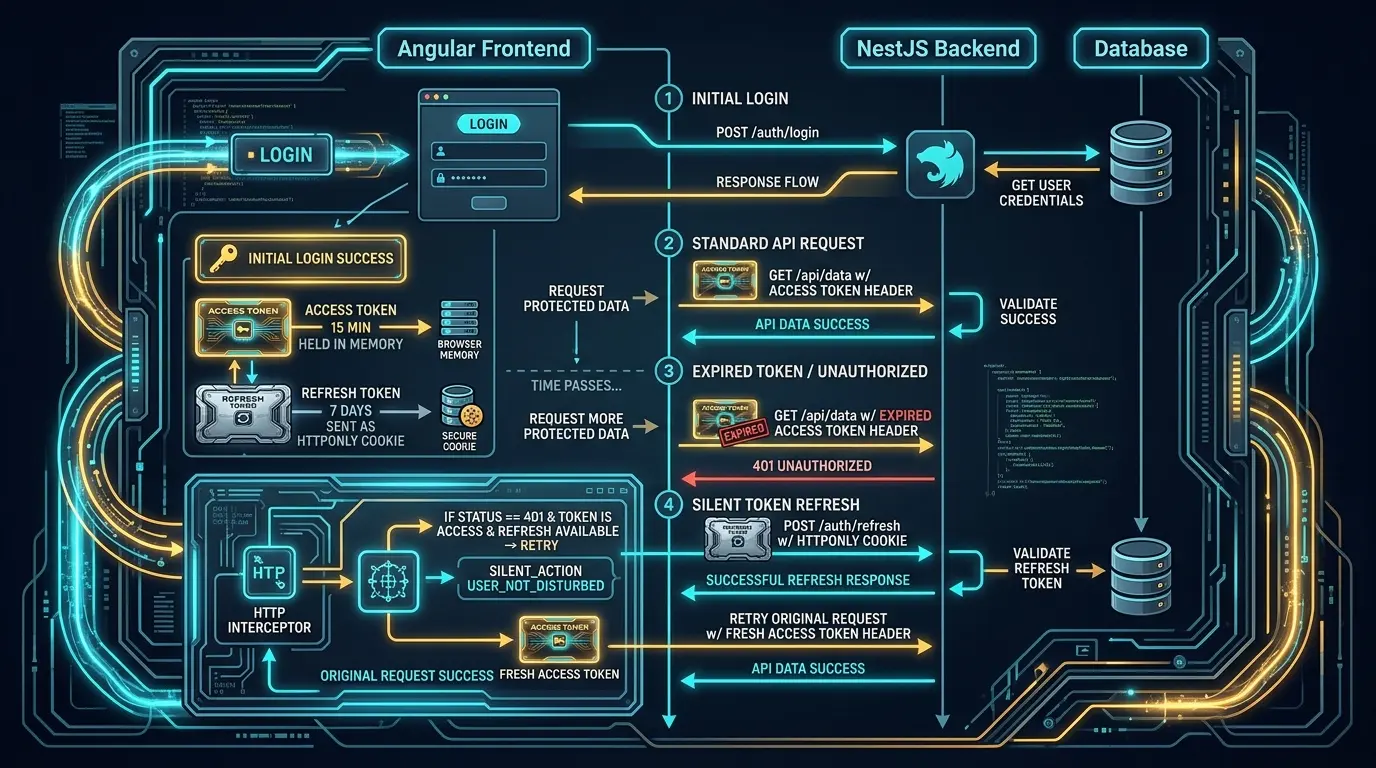
The access token is a credential used by the client to access protected resources on the backend. It contains user claims (like user ID and roles) packed inside a signed JSON Web Token (JWT). Because the backend verifies it statelessly via a secret key, it processes lightning-fast. The catch? It expires fast—usually within 15 minutes.
What is a Refresh Token?
The refresh token exists solely to issue a new access token when the current one dies. It never gets sent to your standard data endpoints (/users, /orders, /dashboard). Instead, it is routed exclusively to a dedicated authentication endpoint (e.g., /auth/refresh).
Why the "LocalStorage + 24-Hour Token" Pattern Is a Security Trap
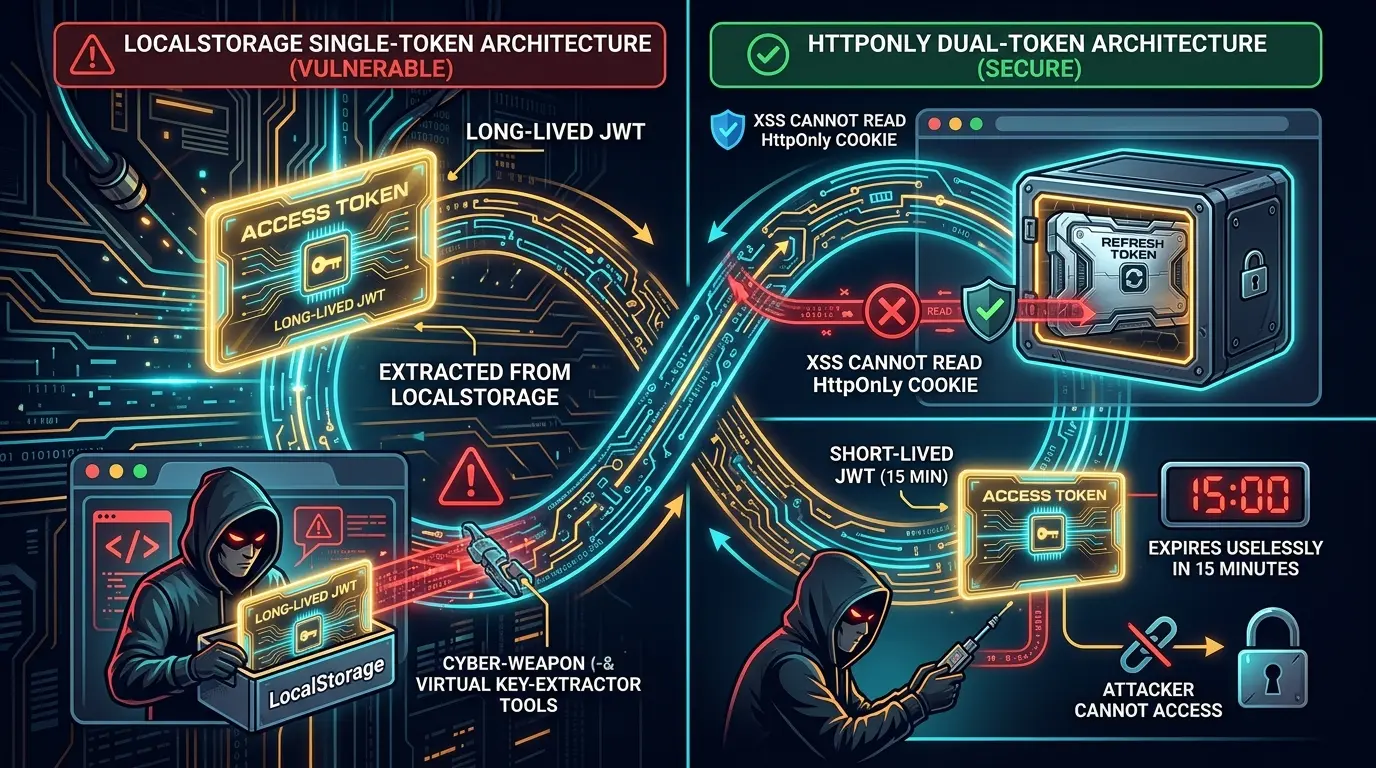
Storing a long-lived JWT in browser localStorage is essentially leaving your house key under the front door mat with a neon sign pointing to it.
[ LocalStorage ]
             │
             ├──> Vulnerable to XSS Attack
             └──> JavaScript can read it anytime
XSS Attacks Have Total Control: Any malicious script running on your DOM can execute localStorage.getItem('token') and instantly exfiltrate your user’s key.
You Cannot Revoke a Stateless Token: If a user’s device is compromised, you cannot invalidate a standard stateless JWT before its expiration time runs out without maintaining expensive server-side blacklists.
Huge Blast Radius: A 24-hour token grants an attacker an enterprise-sized window of opportunity. A 15-minute token limits the breach to a brief splash before the door locks in their face.
By switching to short-lived access tokens kept exclusively in memory, and storing the long-lived refresh token inside an HttpOnly cookie, you render JavaScript incapable of stealing the long-term credential.
Step 1: Building the NestJS Backend
Let's implement the backend logic using NestJS, @nestjs/jwt, and cookie-parser.
1. Database Schema & Token Hashing
First, store a hashed version of the refresh token in your database so you can revoke it if a user logs out or gets compromised.
// user.entity.ts
export class UserEntity {
  id: string;
  email: string;
  passwordHash: string;
  currentHashedRefreshToken?: string | null;
}
2. NestJS Authentication Controller
We need endpoints for login, logout, and refresh. Notice how the refresh token is set in an HttpOnly cookie.
// auth.controller.ts
import { Controller, Post, Body, Res, Req, UseGuards, HttpCode, HttpStatus } from '@nestjs/common';
import { Response, Request } from 'express';
import { AuthService } from './auth.service';
import { AuthDto } from './dto/auth.dto';

@Controller('auth')
export class AuthController {
  constructor(private readonly authService: AuthService) {}

  @Post('login')
  @HttpCode(HttpStatus.OK)
  async login(
    @Body() dto: AuthDto,
    @Res({ passthrough: true }) response: Response,
  ) {
    const { accessToken, refreshToken } = await this.authService.login(dto);

    // Set Refresh Token in secure HttpOnly cookie
    response.cookie('refreshToken', refreshToken, {
      httpOnly: true,
      secure: process.env.NODE_ENV === 'production',
      sameSite: 'strict',
      path: '/auth/refresh', // Restrict cookie transmission to refresh route only
      maxAge: 7 * 24 * 60 * 60 * 1000, // 7 Days
    });

    return { accessToken };
  }

  @Post('refresh')
  @HttpCode(HttpStatus.OK)
  async refresh(
    @Req() request: Request,
    @Res({ passthrough: true }) response: Response,
  ) {
    const refreshToken = request.cookies['refreshToken'];
    if (!refreshToken) {
      response.clearCookie('refreshToken', { path: '/auth/refresh' });
      return response.status(401).send({ message: 'Refresh token missing' });
    }

    const tokens = await this.authService.refreshTokens(refreshToken);

    // Rotate refresh token
    response.cookie('refreshToken', tokens.refreshToken, {
      httpOnly: true,
      secure: process.env.NODE_ENV === 'production',
      sameSite: 'strict',
      path: '/auth/refresh',
      maxAge: 7 * 24 * 60 * 60 * 1000,
    });

    return { accessToken: tokens.accessToken };
  }

  @Post('logout')
  @HttpCode(HttpStatus.OK)
  async logout(
    @Req() request: Request,
    @Res({ passthrough: true }) response: Response,
  ) {
    const refreshToken = request.cookies['refreshToken'];
    if (refreshToken) {
      await this.authService.logout(refreshToken);
    }

    response.clearCookie('refreshToken', { path: '/auth/refresh' });
    return { message: 'Logged out successfully' };
  }
}
3. NestJS Authentication Service Logic
Here is where the token generation and cryptographic comparison take place using bcrypt:
// auth.service.ts
import { Injectable, UnauthorizedException, ForbiddenException } from '@nestjs/common';
import { JwtService } from '@nestjs/jwt';
import * as bcrypt from 'bcrypt';
import { UsersService } from '../users/users.service';
import { AuthDto } from './dto/auth.dto';

@Injectable()
export class AuthService {
  constructor(
    private usersService: UsersService,
    private jwtService: JwtService,
  ) {}

  async login(dto: AuthDto) {
    const user = await this.usersService.findByEmail(dto.email);
    if (!user) throw new UnauthorizedException('Invalid credentials');

    const passwordMatches = await bcrypt.compare(dto.password, user.passwordHash);
    if (!passwordMatches) throw new UnauthorizedException('Invalid credentials');

    const tokens = await this.generateTokens(user.id, user.email);
    await this.updateRefreshTokenHash(user.id, tokens.refreshToken);

    return tokens;
  }

  async refreshTokens(refreshToken: string) {
    try {
      const payload = await this.jwtService.verifyAsync(refreshToken, {
        secret: process.env.JWT_REFRESH_SECRET,
      });

      const user = await this.usersService.findById(payload.sub);
      if (!user || !user.currentHashedRefreshToken) {
        throw new ForbiddenException('Access Denied');
      }

      const refreshTokenMatches = await bcrypt.compare(
        refreshToken,
        user.currentHashedRefreshToken,
      );
      if (!refreshTokenMatches) throw new ForbiddenException('Access Denied');

      const tokens = await this.generateTokens(user.id, user.email);
      await this.updateRefreshTokenHash(user.id, tokens.refreshToken);

      return tokens;
    } catch {
      throw new ForbiddenException('Invalid or expired refresh token');
    }
  }

  async logout(refreshToken: string) {
    try {
      const payload = this.jwtService.decode(refreshToken) as { sub: string };
      if (payload?.sub) {
        await this.usersService.update(payload.sub, { currentHashedRefreshToken: null });
      }
    } catch {
      // Graceful silence on invalid token decode
    }
  }

  private async generateTokens(userId: string, email: string) {
    const [accessToken, refreshToken] = await Promise.all([
      this.jwtService.signAsync(
        { sub: userId, email },
        { secret: process.env.JWT_ACCESS_SECRET, expiresIn: '15m' },
      ),
      this.jwtService.signAsync(
        { sub: userId, email },
        { secret: process.env.JWT_REFRESH_SECRET, expiresIn: '7d' },
      ),
    ]);

    return { accessToken, refreshToken };
  }

  private async updateRefreshTokenHash(userId: string, refreshToken: string) {
    const hash = await bcrypt.hash(refreshToken, 10);
    await this.usersService.update(userId, { currentHashedRefreshToken: hash });
  }
}
Step 2: Implementing the Angular Frontend
On the Angular side, we need an AuthService that holds our access token in memory (via RxJS) and an HttpInterceptor that automatically catches 401 Unauthorized errors to fetch a fresh token behind the scenes.
1. Angular Auth Service
Notice that accessToken is stored in a BehaviorSubject in memory—never in localStorage.
// auth.service.ts
import { Injectable } from '@angular/core';
import { HttpClient } from '@angular/common/http';
import { BehaviorSubject, Observable, tap } from 'rxjs';

@Injectable({
  providedIn: 'root',
})
export class AuthService {
  private readonly API_URL = 'http://localhost:3000/auth';
  private accessTokenSubject = new BehaviorSubject<string | null>(null);

  public accessToken$ = this.accessTokenSubject.asObservable();

  constructor(private http: HttpClient) {}

  public get accessTokenValue(): string | null {
    return this.accessTokenSubject.value;
  }

  login(credentials: { email: string; password: string }): Observable<{ accessToken: string }> {
    return this.http.post<{ accessToken: string }>(
      `${this.API_URL}/login`,
      credentials,
      { withCredentials: true } // Crucial for receiving HttpOnly cookies
    ).pipe(
      tap(response => this.accessTokenSubject.next(response.accessToken))
    );
  }

  refreshToken(): Observable<{ accessToken: string }> {
    return this.http.post<{ accessToken: string }>(
      `${this.API_URL}/refresh`,
      {},
      { withCredentials: true } // Crucial for sending HttpOnly cookies
    ).pipe(
      tap(response => this.accessTokenSubject.next(response.accessToken))
    );
  }

  logout(): Observable<void> {
    return this.http.post<void>(
      `${this.API_URL}/logout`,
      {},
      { withCredentials: true }
    ).pipe(
      tap(() => this.accessTokenSubject.next(null))
    );
  }
}
2. Angular HTTP Interceptor
This interceptor injects the access token into outgoing API requests. If a request fails with a 401 Unauthorized, it queues incoming requests, triggers the refresh endpoint, updates the token, and retries the failed requests seamlessly.
// auth.interceptor.ts
import { Injectable } from '@angular/core';
import {
  HttpRequest,
  HttpHandler,
  HttpEvent,
  HttpInterceptor,
  HttpErrorResponse,
} from '@angular/common/http';
import { Observable, throwError, BehaviorSubject } from 'rxjs';
import { catchError, switchMap, filter, take } from 'rxjs/operators';
import { AuthService } from './auth.service';

@Injectable()
export class AuthInterceptor implements HttpInterceptor {
  private isRefreshing = false;
  private refreshTokenSubject: BehaviorSubject<string | null> = new BehaviorSubject<string | null>(null);

  constructor(private authService: AuthService) {}

  intercept(request: HttpRequest<unknown>, next: HttpHandler): Observable<HttpEvent<unknown>> {
    let authReq = request;
    const token = this.authService.accessTokenValue;

    if (token) {
      authReq = this.addTokenHeader(request, token);
    }

    return next.handle(authReq).pipe(
      catchError((error) => {
        if (
          error instanceof HttpErrorResponse &&
          error.status === 401 &&
          !request.url.includes('/auth/refresh') &&
          !request.url.includes('/auth/login')
        ) {
          return this.handle401Error(request, next);
        }
        return throwError(() => error);
      })
    );
  }

  private addTokenHeader(request: HttpRequest<unknown>, token: string) {
    return request.clone({
      headers: request.headers.set('Authorization', `Bearer ${token}`),
    });
  }

  private handle401Error(request: HttpRequest<unknown>, next: HttpHandler) {
    if (!this.isRefreshing) {
      this.isRefreshing = true;
      this.refreshTokenSubject.next(null);

      return this.authService.refreshToken().pipe(
        switchMap((res) => {
          this.isRefreshing = false;
          this.refreshTokenSubject.next(res.accessToken);
          return next.handle(this.addTokenHeader(request, res.accessToken));
        }),
        catchError((err) => {
          this.isRefreshing = false;
          this.authService.logout().subscribe();
          return throwError(() => err);
        })
      );
    }

    // Queue concurrent requests while token is refreshing
    return this.refreshTokenSubject.pipe(
      filter((token) => token !== null),
      take(1),
      switchMap((token) => next.handle(this.addTokenHeader(request, token!)))
    );
  }
}
Conclusion
Transitioning from a single, long-lived JWT stored in localStorage to a dual-token strategy dramatically shrinks your application's attack surface without degrading user experience.
Access Tokens stay short-lived (15 mins) and live purely in memory.
Refresh Tokens live safely in HttpOnly cookies, unreachable by malicious JavaScript.
Angular Interceptors handle token renewal silently behind the scenes.
NestJS keeps state control over refresh tokens, allowing instant user revocation when needed.
Stop leaving your keys under the door mat. Upgrade your app’s authentication architecture today!