There is a specific, cold sweat that only hits a developer when they realize they have built an architectural masterpiece that is completely invisible to the rest of the human race. You spend three months carefully crafting the perfect frontend architecture—custom hooks, silky smooth client-side transitions, state management tight enough to land a rocket, and NestJS powering a rock-solid REST API in the background. You hit deploy. You sit back, put your feet up on the desk, and sip your cold brew, waiting for Google to shower your tech blog with organic traffic.
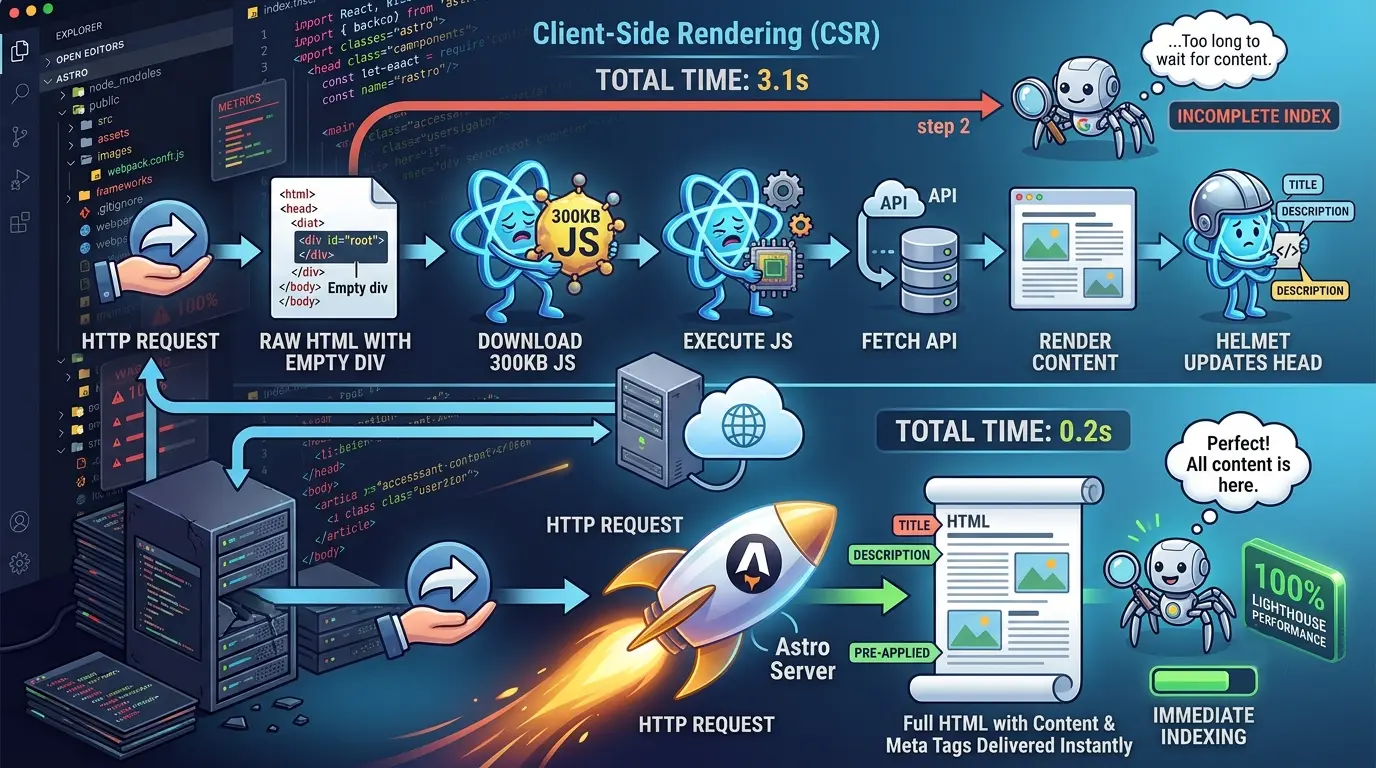
Two weeks later, you check Google Search Console. Crickets. You search for your exact article titles in quotes. Nothing. You inspect the indexed URL and realize Google’s crawler crawled your shiny React Single Page Application (SPA), looked at your index.html , saw , said "cool empty page, thanks!" and left. Welcome to the classic Single Page Application SEO tragedy—a place where JavaScript reigns supreme, browsers choke on 300KB bundles, and search engines pretend you don't exist.
Part 1: The Tragedy of "Fake SEO" and Fragile Build Hacks
Stage 1: The Illusion of React Helmet
When I first noticed my SEO rankings were hovering near zero, my immediate reaction was: "No big deal, I’m just missing document head management." Enter react-helmet I wrapped my components, dynamically set <title> and Open Graph meta tags based on the blog post state fetched from my NestJS API, and pushed to production.
Here is what I thought was happening:
<!-- What developers THINK React Helmet does for crawlers: -->
<html>
  <head>
    <title>My Awesome Technical Blog Post</title>
    <meta name="description" content="Deep dive into NestJS and React..." />
  </head>
  <body>...</body>
</html>
Here is what was ACTUALLY delivered on the first byte from my GitHub Pages static server:
<!DOCTYPE html>
<html lang="en">
  <head>
    <meta charset="utf-8" />
    <title>My React App</title> <!-- Default generic title -->
  </head>
  <body>
    <div id="root"></div> <!-- Literally nothing -->
    <script src="/static/js/main.7f82a9b1.js"></script>
  </body>
</html>
Here is the hard truth I had to learn the painful way: Client-side Helmet is fake SEO. React Helmet injects meta tags into the DOM after JavaScript executes in the browser. While Googlebot claims to execute JavaScript, it operates on a two-pass indexing system with limited execution budgets. If your content requires an API network call to NestJS followed by a client-side React rerender to inject page titles, the crawler has moved on to index someone else's site before your React bundle even finishes parsing.
Stage 2: The Fragile Nightmare of react-snap Prerendering
Refusing to migrate frameworks yet (because who doesn't love sunk cost fallacy?), I doubled down on my React setup and installed react-snap . The pitch sounded amazing: run a headless Puppeteer browser post-build, crawl local routes, scrape the rendered DOM, and dump flat HTML files into the output directory.
It worked for about three days. Then the continuous integration nightmare began. CI builds on GitHub Actions began failing at random 30% of the time. Puppeteer would hang waiting for my NestJS staging API, or time out during route discovery, or fail to pre-render dynamic blog slug routes entirely because the post build script didn't know which URLs existed without an automated sitemap crawler.
I was sitting on a fragile stack: a Client-Rendered App patched with a post-build headless browser monkey-patch, deployed on GitHub Pages. It was time to pull the plug and restructure.
Part 2: The Migration to Astro (Step-by-Step)
My requirements for the new architecture were non-negotiable:
Zero Downtime & URL Preservation: Every existing link structure had to remain identical.
Free Static Hosting: Stay on GitHub Pages.
Maintain Interactivity: Keep complex UI components written in React without shipping 300KB of runtime JS for static text pages.
Decouple Admin Dashboard: Move the heavy, authenticated admin dashboard completely out of the public static repo.
Step 1: Splitting the Admin Dashboard to Vercel
Before touching Astro, I ripped out the private admin portal from the main codebase. Public readers shouldn't download state management libraries, form builders, and rich text editors just to read a 500-word article on database indexing.
I spun up a dedicated React SPA repository for the admin dashboard, pointing directly to the NestJS backend, and deployed it to Vercel at admin.mysite.com . The main repository was now 100% public facing content.
Step 2: Astro Setup and the Headless Meta Replacement
I initialized Astro inside a parallel branch and configured the React integration using @astrojs/react . React components were moved into an /islands folder, while static pages were converted to .astro files.
Goodbye react-helmet . Hello native Astro frontmatter and document head rendering:
---
// src/layouts/BlogPost.astro
import BaseHead from '../components/BaseHead.astro';

interface Props {
  title: string;
  description: string;
  image?: string;
}

const { title, description, image = '/default-og.png' } = Astro.props;
---

<html lang="en">
  <head>
    <meta charset="utf-8" />
    <meta name="viewport" content="width=device-width, initial-scale=1" />
    <title>{title}</title>
    <meta name="description" content={description} />

    <!-- Open Graph / Social -->
    <meta property="og:type" content="article" />
    <meta property="og:title" content={title} />
    <meta property="og:description" content={description} />
    <meta property="og:image" content={new URL(image, Astro.url)} />
  </head>
  <body>
    <slot />
  </body>
</html>
Because Astro executes frontmatter logic at build time, the rendered output in dist/index.html contains the complete metadata on the very first byte delivered by the web server.
Step 3: Static-First Dynamic Route Generation
Instead of relying on react-snap to guess routes, Astro utilizes getStaticPaths() to fetch data from the NestJS REST API during the build phase and compile every blog post into a pure HTML file.
---
// src/pages/blog/[slug].astro
import BlogPostLayout from '../../layouts/BlogPostLayout.astro';

export async function getStaticPaths() {
  // Fetch all post slugs from NestJS backend during build
  const response = await fetch('https://api.mysite.com/v1/posts');
  const posts = await response.json();

  return posts.map((post: any) => ({
    params: { slug: post.slug },
    props: { post },
  }));
}

const { post } = Astro.props;
---

<BlogPostLayout title={post.title} description={post.summary}>
  <article class="prose max-w-none">
    <h1>{post.title}</h1>
    <div class="metadata">Published on {post.publishedAt}</div>
    <div set:html={post.contentHtml} />
  </article>
</BlogPostLayout>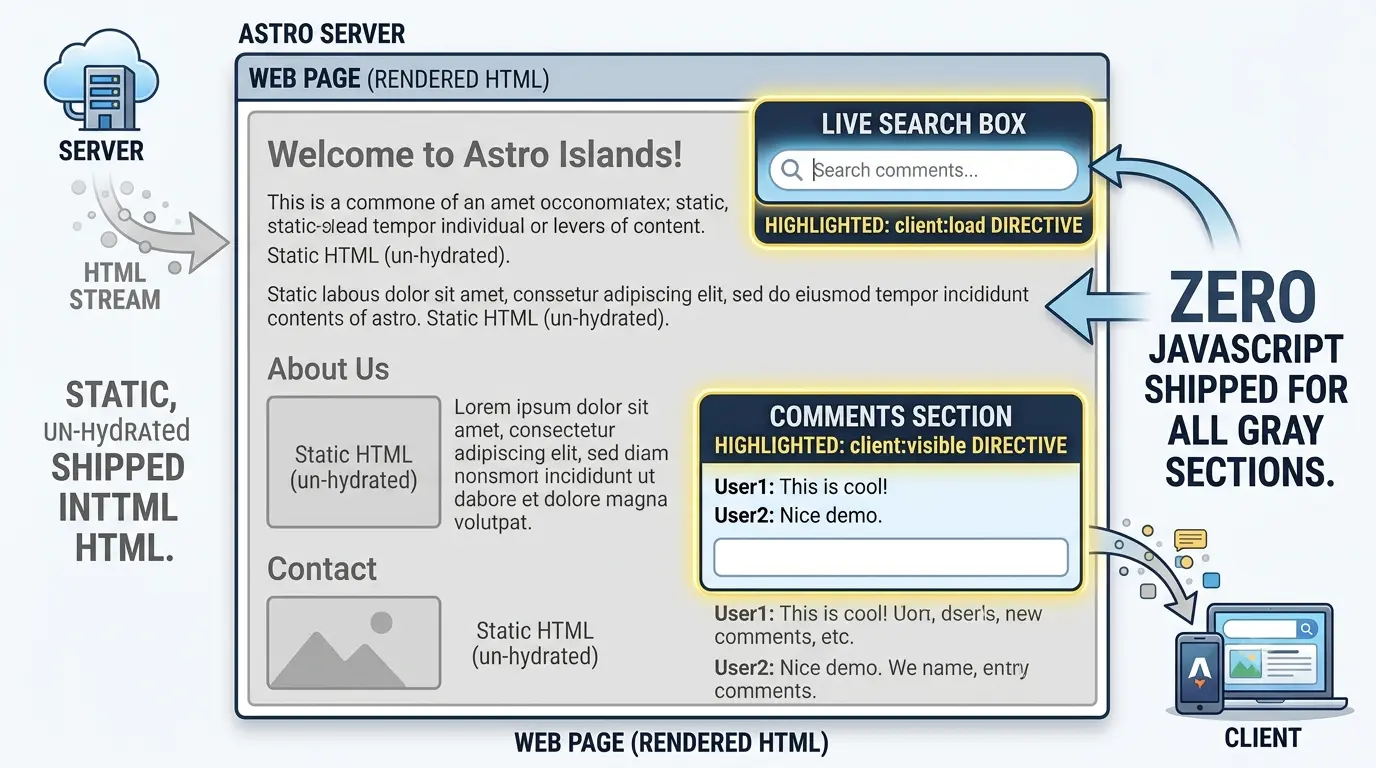
Step 4: Leveraging Islands for Selective Interactivity
Not everything on a blog is static. I had interactive components: a complex search modal, blog filters, and sorting options. In standard SPA setups, you bundle React for the whole page just to animate one button.
With Astro's Island architecture, components are static HTML by default and only hydrated with client JS when specified via directives:
---
// src/pages/index.astro
import Layout from '../layouts/Layout.astro';
import StaticHeader from '../components/StaticHeader.astro';
import SearchBar from '../components/islands/SearchBar.jsx'; // React component
import NewsletterModal from '../components/islands/NewsletterModal.jsx'; // React component
---

<Layout title="Welcome to My Tech Blog">
  <StaticHeader />

  <!-- Hydrate immediately on page load -->
  <SearchBar client:load />

  <main>
    <!-- Static HTML content rendered at build time -->
  </main>

  <!-- Hydrate ONLY when user scrolls down to view it -->
  <NewsletterModal client:visible />
</Layout>
Part 3: The Results & Metrics Benchmark
After finalizing the migration and pushing the static output to GitHub Pages via a streamlined GitHub Actions workflow, the performance differential was staggering.
Metric | Before (React SPA + Helmet + react-snap) | After (Astro Static + Islands | Improvement |
|---|---|---|---|
Lighthouse Performance | 42% | 98% | +133% boost |
Lighthouse SEO | 65% | 100% | Perfect Score |
Lighthouse Accessibility | 78% | 95% | +21.7% boost |
First Contentful Paint (FCP) | 3.1 seconds | 0.6 seconds | 80.6% faster |
Build Time (CI) | 3 minutes (Fragile) | 45 seconds (Reliable) | 75% faster build |
JS Bundle Size Shipped | 300 KB | 45 KB (Islands only) | 85% reduction |
Key Takeaway for Technical Leaders: Stop fighting client-side rendering for content-first websites. Single Page Applications are powerful tools for dashboard UI applications behind authentication, but for public web pages where discoverability, speed, and reliability matter, server-rendered static HTML with selective hydration is undisputed champion.